


Best personal alarms for the elderly
Personal alarms are pendants or watches worn to call for help by an older person after a fall, medical emergency or if they get lost. In their simplest form, personal alarms for the elderly feature a big, clear panic button that can be pressed, connecting any time day or night, to a care team or family member for assistance.
A personal alarm will help an older person to remain living independently and safely at home, giving peace of mind to their families.
Our list of the best personal alarms for the elderly have been tested by our panel of over 70s reviewers for at least a week, after which we asked them their thoughts. We highlight key features and provide ratings for customer service and value for money/price.


- Kay, 88


– Sacha, 71


- Roey, 89
- Features - how many features do they have and how useful are they?
- Price - are you getting value for money with the yearly cost of the alarm?
- Customer Service - support, friendliness and service
Our 6 best personal alarms for the elderly
1. SureSafeGO
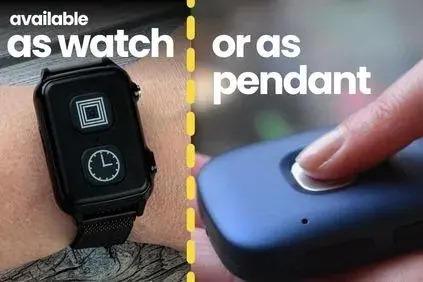

Best for most people, this alarm has all the latest features at a reasonable price.
Discount: 1st Month Free
Age Space Users automatically get their 1st Month Free
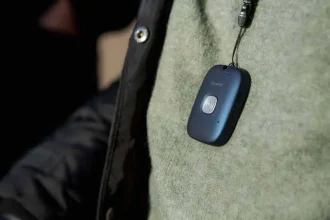
All the same features as the watch, just worn around the neck
Discount: 1st Month Free
Age Space Users automatically get their 1st Month Free
- Automatic Fall Detection
- Speak directly through the alarm
- Mobile - Wear it anywhere (at home and out and about)
- GPS Location
- Alarm linked to mobile phone through Friends & Family App - notifications, view geo-fences, chat feature, activity notifications
The SureSafeGO will meet the needs of most people. It covers the important requirements of having an emergency call button and automatic fall detection. It should work anywhere the wearer is located as it is a mobile alarm with an inbuilt SIM. It enables the wearer to talk to the 24/7 response team through the alarm pendant itself.
It includes extra useful features without adding too much to the price. The Friends and Family App enables: geo-fencing for notifications if the location of the wearer changes at a strange time; a chat feature for carers to co-ordinate help, as well as a step counter and activity monitor.
- Emergency button
- Step / Activity counter (with App)
- 7-10 day battery life
- Showerproof
- Geo-Fence capabilities (with App)
- Home Beacon for Accurate Location
- Worn around the neck (or on a belt with additional purchase)
- Chat Feature (with App)
- Digital voice quality when speaking through the device
- Easy-to-use charging cradle
A brilliant all-round alarm with fall-detection, gps capabilities and a hand friends and family app.
Read the full SureSafeGO Review
- One-off set-up cost of £75
- Then from £19.99 / month when paid annually (for the first year)
Automatically includes your first month free, and Friends and Family App (worth £36 / year). After the first year it renews at £31.50 /month (paid annually).
If you want to pay quarterly you can at £31.50.
It is also available as Family Monitored which would be a different price.
SureSafe Alarms are leading providers of personal alarms for the elderly. They offer a broad range of alarms that can be used both in the home as well as when ‘out and about’. They help over 170,000 people in the UK through two UK-based monitoring centres, 24 hours a day, 7 days a week. SureSafe are rated ‘Excellent’ by their customers on Reviews.io and average 4.8 out of 5 stars. 98% of customers say they would recommend SureSafe to a friend.
2. Careline SmartLife
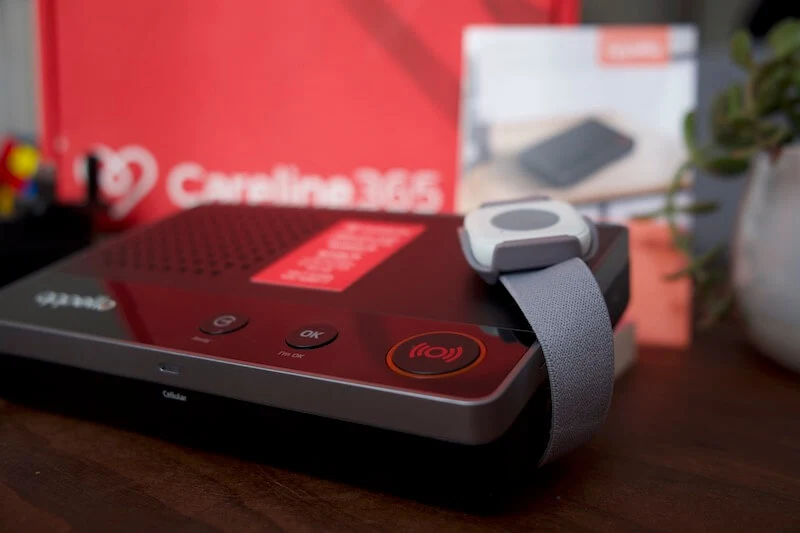

If you don’t want or need a mobile alarm, or you don’t want to worry about charging, we think this is a good option.
Discount Code: (SAVE £20)
- Digital in-home alarm - doesn't need a landline, just mains power
- Pendant never needs charging
- Super simple set up
- Emergency button
- 24/7 monitoring by trained care team
- Internet connectivity for dual connection
As a digital in-home pendant alarm the Careline SmartLife is great for anyone who would benefit from the security of a personal alarm at home, but doesn't need one out and about: because they are housebound, or when they're out they are accompanied by someone. It is easy to set up, just plug the base unit into the mains, put it on and press the emergency button if needed. You can add automatic fall detection for £4 a month if the wearer is less stable on their feet.
Its main feature is the SOS call button and connection to the 24/7 care team, and is ideal for those with a tight budget.
- 600m range
- Add fall detection for just £4/month
- Waterproof
- Base unit has 24 hour battery back-up in case of power cut
- Wear with a wrist strap or as a neck pendant
- Less than 10 second response time
- Lightweight design
- Internet connectivity for dual connection - both SIM (like your mobile) and through the Wi-Fi means your connection is always optimised and covered in the event of a powercut
"It was almost too simple to set up and use! Technology usually takes me a while to get my head round however this really was as simple as plugging it in anywhere I wanted!" - Sacha, 71
Buy Annually (with Age Space Discount) = £203.88 + one-off set-up fee of £49. A monthly equivalent of £16.99
Buy Quarterly (with Age Space Discount) = £90.97 every 3 months + one-off set-up fee of £49. A monthly equivalent of £30.32.
Careline365 is a leading provider of personal alarms for the elderly and disabled. They provide a life-saving service up and down the UK, helping thousands of people stay safe and independent in their own homes.
With a range of simple, affordable alarms and accessories, Careline users can rest assured that help is always on hand. The Careline Response Centre is based right here in the UK and operates 24 hours a day, 365 days a year. They rated as excellent on Trustpilot from over 2,200 reviews.
3. Telecare24 Fall Alarm Plan


For a simple fall alarm pendant, at a good price, we recommend the Telecare24 Fall Alarm Plan.
Discount Code: (SAVE £10)
- Emergency button
- Automatic fall detection
- In-home alarm
- Digital Connection (not landline)
- 24 / 7 monitored
The Telecare24 Fall Alarm Plan is ideal for people who who just want a simple alarm with fall detection. This product will appeal to someone who is housebound, frail and at a high risk of falls.
This is the best value/cheapest fall alarm on this page. Telecare24 is a well respected provider with an award winning 24/7 response team.
- Wear as watch or as a pendant
- Call directed through base unit
- Waterproof
- 200m range
- 18 - 24 month battery life
- Two wearing options
- 24/7 monitored
- 35 grams
- Fall sensor: 37 x 33 x 12.7mm
Super simple and affordable fall detecting alarm.
£170 billed annually (including Age Space discount) + one-off set-up cost of £45
Telecare24 is the only national personal alarm and careline service that is recommended by TV’s Dr Hilary Jones. Telecare24 is rated ‘Excellent’ by its customers, with new positive reviews every day
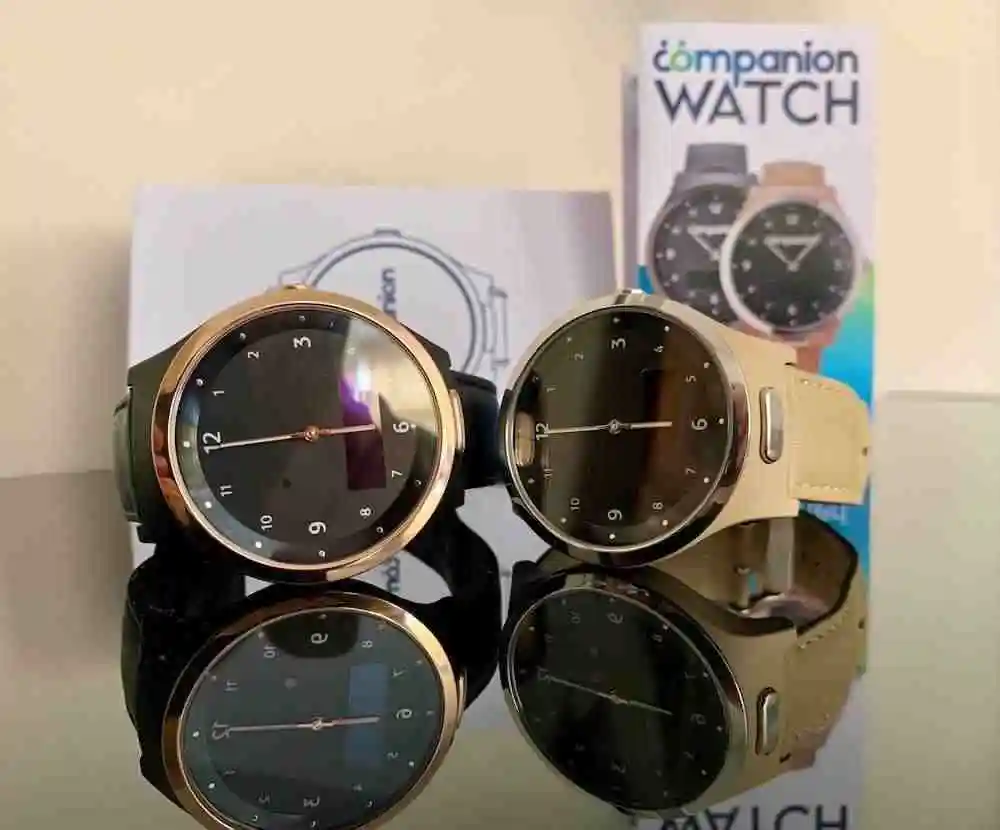
4. Companion Personal Alarm Watch


If you are looking for a more discrete mobile elderly personal alarm, with the ability to talk through the watch should you need help.
Discount Code: Save £20 off a new watch
- Works and looks just like a normal watch
- Automatic fall detection
- Talk directly through the watch
- GPS, heart rate and activity monitored
- Family Monitored - alarm linked to mobile phone app and website
The Companion Watch is ideal for those who want something that looks different from the more classic form. This personal alarm looks, and tells the time, just like a normal watch.
The look was very important to our reviewer Roey who readily switched to the Companion Watch from a classic pendant alarm. She knew she needed the protection of a personal alarm, and her family needed that reassurance, but disliked wearing the SOS pendant.
The Companion Watch has another important feature: a health tracker, tracking heart rate, activity and respiratory rate. Many users give the account log-in details to their GP so they get a live update on heart rate variations.
- Panic button you can cancel
- Easy-to-use charging cradle
- Cycles through emergency contacts until call is answered
- Up to 5 day battery life
- Water-resistant
- Multiple colours available
- Geo-fences
- Accompanying app for friends and family
- 46mm diameter
- 13.99mm thickness
- 45 grams
“I love it. People just don’t believe it’s a personal alarm watch. I’m not embarrassed to wear it and in fact I get a lot of compliments” - Roey, 89
Buy new at £295 + £25 / month for monitoring
or you can buy a refurbished, like-new watch at £195 + £25 / month
Companion are a newer company in the personal alarm space who saw a gap in the market for a stylish wrist alarm that takes useful features from smart watches.
They pride themselves on a personal customer experience and a great product.
5. Taking Care Dementia Tracker Watch

This personal alarm watch has been designed with dementia in mind, and has all the features to help keep the wearer safe and found.
Get 1 months free with annual plan
- Find location of your loved one quickly and easily
- Looks and wears just like a smart watch
- Set-up "safe-zones" to be notified when the watch enters or leave a specific place
- And SOS button and 24/7 monitoring team trained to help those with dementia
- Doesn't need a landline, Wi-Fi of mobile phone
- Friends & family app enables remote viewing of location, battery status and activity levels
This personal alarm watch is designed with those with dementia in mind. The location and safe-zone capabilities make for greater reassurance with one of the common symptoms of dementia: wandering.
In another sense however, these features, along with all the other aspects of this alarm, make this an alarm just a great option for anyone who wants a good looking, subtle alarm, gets out and about, and wants to rely on a well-established personal alarm company.
- SOS button
- Friends & Family app enables location tracking and safe-zones
- Fully mobile (works anywhere)
- Talk directly through the watch to a 24/7 monitoring team
- Comfortable and discrete
- Quick charging (90mins to full)
- 3 days battery life
- Not for use in bath or shower but it will be okay in the rain
- 30-day money back guarantee
This is a perfect alarm watch for people with dementia, at any stage, especially if you are worried about their wandering. However, it is also ideal for basically anyone who is out & about a lot and wants the protection of being able to call for help whenever, from wherever. - Ben, Age Space's Tech Guru
Calculated Annual Cost of £429.88
Includes:
- £329.89 Annual cost
- £99.99 one-time set-up fee
You can also pay monthly (£29.99 / month)
Taking Care work closely with Age UK as the exclusive supplier of the Age UK Trading Personal Alarm Service. They are the largest private provider of personal alarms in the UK, and have three, UK-based, Emergency Resolution Centres to ensure no alarm call goes unanswered. The 24/7 award-winning service is rated ‘excellent’ on Trustpilot, is TSA-accredited and certified to the Quality Standards Framework. Taking Care have a range of alarm products that can be used at home, in the garden or out and about, including fall sensors and GPS personal alarms.
6. SECOM Smart Wellness


Personal alarm pendants aren't for everyone. A great alternative for those who might benefit from non-intrusive motion sensors at home.
- A monitoring set-up tailored to individual needs
- No cameras - only sensors
- Learns daily activity patterns to identify changes in behaviour
- Home security included
- All visible through an app for families
Perfect for people who don't like or remember to wear their personal alarm, the SECOM Smart Wellness is a non-intrusive approach to making sure your loved one is safe.
Its sensors, placed discreetly around the home, identify and capture daily patterns of activity and behaviour and will alert you when significant change is detected. Plus it comes with some home security capabilities.
- Call with SECOM to determine the package that is right for your needs
- Basic pack contains:
- 2 Pet-tolerant movement Detectors
- 2 Door Open / Close Detectors
- Full Intruder Alarm System - Sounder and Control Panel
- Automatic Behaviour Trends Report - and notifications if something seems wrong
- Customisable Notifications - e.g. if the front door has opened at a strange time or hasn't been closed
Read a full look through the SECOM SmartWellness package (full review coming soon)
Package is tailored around your needs. Basic package starts at £250.90
+ £30.64 monthly monitoring
SECOM are a well-known and respected company in the security sector, who have used their knowledge and experience to create a smart home monitoring system to give security, independence and reassurance to older relatives and their families.
Buyer's guide to choosing the best personal alarm for you
You, an elderly parent or relative may be worried about a fall alone at home, unable to get out of the bath, or a health emergency out shopping or walking. Wearing a personal alarm means they can summon help, and speak directly with a trained member of a 24/7 care team, or a designated contact. Motion sensors in-built to some alarms will automatically detect a fall and trigger the alarm if the wearer is unable to do so themselves.
Personal alarms are constantly evolving and the choice is wide: from simple alarms connected via the landline for use in the home, to mobile/digital alarms with a range of features that work wherever there is a mobile signal.
To choose the most suitable personal alarm, we have compiled the main considerations for you here:
1. Do you need it to work everywhere?
Where will the personal alarm be used? If you want an alarm that will work both in the home and when the wearer is out in town or on walks alone, then you will need a mobile alarm like the SureSafeGO, Companion Watch or Taking Care Anywhere.
If the alarm will only be used at home, and the wearer can speak, possibly at a distance, through the base unit, then an in-home alarm is all that is needed. Here we recommend the Careline SmartLife or Telecare24 Fall Plan.
If you’re not sure then it is safer to go with a mobile alarm that will work everywhere.
2. Talk through the alarm or base unit?
Mobile alarms allow the wearer to talk to the monitoring team directly through the pendant or watch. This is an important feature when the wearer is either away from the home, or if they fall in or around the home but out of speaking range of the base unit. These alarms include the SureSafeGO, Companion Watch or Taking Care Anywhere.
In-home alarms are a more waterproof, smaller and cheaper option however, the wearer needs to be able to communicate with the monitoring team through a base unit, plugged into the wall in the home. The microphone in the base unit is sensitive and the call centre teams speak clearly and loudly and are trained to speak with wearers who may have fallen some way from the base unit. If they can’t hear the wearer after an alert is sounded they can call a neighbour or family member to go round to make sure all is well. The following alarms work like this: Careline SmartLife or Telecare24 Fall Plan.
3. Landline, mobile signal or Wi-Fi connection?
Different personal alarms use different methods to connect user to monitoring team.
Mobile alarms use SIM cards (like a mobile phone), and in-home alarms either use a landline or a digital connection.
We recommend choosing your preferred alarm first and talking with your chosen provider to determine how best to set up that alarm in your home.
4. Is GPS tracking important?
In-home alarms do not have GPS capabilities.
Mobile alarms all have GPS capabilities, but not all of them make these accessible to the family. The Taking Care Anywhere only uses the GPS function to locate the wearer if an alert call has been made.
The SureSafeGO (with app) and Companion Watch allow family members to locate the wearer and set up areas call ‘Geo-fences’ that enable an alert to be sent if the wearer enters or leaves a denoted area at a strange time. For SureSafe you will need to ask them to set up the geo-fence for you.
Mobile Fall Alarm for the Elderly
- Works everywhere (mobile)
- Talk through the pendant
- Mobile connection
- GPS tracking

SureSafeGO
In-Home Personal Alarm for Seniors
- Works in-home only
- Talk through the base unit
- Digital or Landline connection
- No GPS tracking needed

5. Payment options and value for money
Most providers have a few ways for you to buy your alarm and different ways to break down the costs.
24/7 Monitoring requires a monthly payment of between £10-£20. In some cases you can pay for this in one annual payment that can save you money in the long run.
Most providers have a one-off set-up fee that covers postage and setting up the device and emergency contacts on their systems. This is between £30 and £70.
Rented devices come with no initial cost, although you will have to return it when it is no longer in use. Purchased ones will come with an initial fee to buy the device. This won’t include any further monitoring costs.
Finally, some providers offer extras that can be added to your plan including automatic fall detection, wellness monitoring and notifications, additional app features, keysafes and more.
You can save money when buying annually
Example: Telecare24’s Fall Alarm Plans
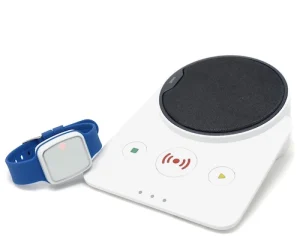
Telecare24 provides options to pay either monthly or annually.
- Pay monthly from £24/month or...
- Pay annually working out to £19/month (save £60)
6. Automatic Fall Detection
Automatic fall detection refers to the ability for the wearable device to detect when a fall has occurred, sending out an alert without the wearer needing to press the SOS button. All the alarms on our list include automatic fall detection (the Careline Smartlife for an additonal £4 / month).
7. Type of monitoring
When the SOS pendant is pressed on most personal alarms, the alert goes to a 24/7 monitoring centre, where a trained team member will contact with the wearer through the pendant to understand what is wrong and resolve the situation. This means that help is available whatever time of day or night.
Another option is to agree a list of priority contacts who receive the alarm notification. This avoids paying for the monthly monitoring but does put the onus on the family contacts to be available to answer the call.
The SureSafeGO is available in both 24/7 monitored and family monitored options. The Companion Watch is only family monitored. All other options on this page are only available as 24/7 monitored.
24/7 Monitored Personal Alarm
- Trained monitoring response team available 24/7
- Monthly monitoring cost needed
- No app or visibility of location or health data
Friends & Family Monitored Alarm
- Watch cycles through emergency contacts until answered
- Monthly costs to cover SIM usage
- App allows overview of GPS location and health data
8. How will they wear it?
Most personal alarms have a few options when it comes to wearing them. They can be worn around the neck as a pendant, on the wrist like a watch, clipped to a belt or attached to a keychain.
One important consideration is that some mobile alarms can not be worn around the neck if the wearer has a pace maker, however they do have other wearing options.
Ben Steel
This information on this page was
researched and written by Ben, our in-house elderly technology expert.
He consulted both information on each device found online, his own experience with the device and the thoughts and experience of our panel of over 70s reviewers with each device.
FAQs on buying a personal alarm for elderly relatives
Q. How do personal alarms work?
A. There are many different types of personal alarms but the idea is similar for each one. Your older relative wears a simple button pendant all the time that they can press to alert someone that they need help. A personal alarm can work anywhere (mobile) or only in the house (landline-based), include extra features (e.g. GPS or fall detection), or be answered by either a trained, 24/7-available response team or a trusted family member.
Q. How does the digital switchover affect buying a personal alarm
A. The Digital Switchover is a planned switching of all home phone lines from analogue to digital by 2025. For households with an analogue personal alarm – one that uses a landline – there will be changes for it to be able to work. You can learn more about the digital switchover in our simple guide.
Q. What is the difference between a mobile and a landline-based personal alarm?
A. Elderly alarms are designed to be as simple as possible to set-up and use and are either mobile or landline-based. If a personal alarm is mobile it means there will be a SIM card (exactly like those used in phones) inside that allows the pendant to work wherever there is a mobile signal. This means that your relative can wear it in the garden or when they are out and about, safe in the knowledge that if they fall or get lost, they can press the button and get help.
Landline-based personal alarms are usually smaller, simpler to use, and cheaper, but will only work a certain distance from a ‘base unit’, plugged into the landline (i.e. within the house). When your relative presses the alarm button the monitoring team will only be able to talk to them through the base unit.
Both types of alarm are better at different things. Mobile alarms have more additional features, (sometimes) enable communication directly through the pendant, and work anywhere but landline alarms can be more reliable (as they almost always have signal), easier to use, waterproof, and never require charging
Q. Are all personal alarms monitored?
A. No. While most personal alarm packages include monitoring from a UK-based, 24/7-active trained monitoring centre, you can also find options that alert a family member directly if the emergency call button is pressed. The simplest personal alarms will just make a loud noise that can alert someone living in the same house. These options are less expensive but do rely on someone always being within range of hearing the alarm to provide help.
Q. What should I consider before purchasing a personal alarm?
A. If you’ve decided that a personal alarm would make living independently safer for your elderly parents, and would reassure the family, there is still a lot to consider depending on you and your parent’s circumstance.
For example: Dementia/wandering:
GPS ability: If your relative is more active or has a dementia meaning they are prone to wander, you will probably need a mobile, GPS-aware personal alarm. This enables you to be able to locate, and get help to, your relative even if they don’t know where they are themselves. Other things that might be included in the price of a personal alarm for elderly parents are the type of monitoring and whether you want to include fall detection (that sends an alert if it detects a fall, even if the button hasn’t been pressed).
Q. How much should a personal alarm for elderly parents cost in the UK?
A. The answer depends on what features are included in the alarm. For a basic emergency call button and landline-based base unit, you can expect to pay between £100 – £250 a year. For a personal alarm with additional features such fall detection and GPS you could pay between £200-500. Other things that might be included in the price of a personal alarm are:
– One-off set-up/installation/registration fees
– Monthly subscription to 24/7 monitoring
– SIM card costs (for mobile personal alarms)
Q. Do I need to pay VAT on a personal alarm?
A. Personal alarms are applicable for VAT exemptions if the person you are buying for has a long-term health condition that they receive medical treatment for, a chronic illness, or they are registered disabled. Advanced age is not enough on its own to qualify someone for VAT exemption. To get a VAT exemption you must prove to the seller that you are eligible – usually they will offer you a form to fill out, or that you can fill out on behalf of the person you are buying for.
Q. Can I get a personal alarm from my local council or authority?
A. Yes, in some places in the UK, local councils supply ‘lifeline alarms’ to those who need them. These are just simple pendant alarms for the elderly with the emergency call button and landline base unit. Some councils pay for it outright or will ask you to make a contribution towards the, depending on your relative’s financial circumstance. Often they will be an option following the result of a care needs assessment.
Q. What happens if the emergency call button is pressed accidentally?
A. Don’t worry, monitoring teams are very used to this happening and won’t be annoyed – just relieved that there is nothing wrong. It is much better for your elderly relative not to be worrying about accidentally pressing the button versus not pressing it if they are in trouble. However, depending on the alarm they have, they might need to recharge the pendant after pressing the emergency call button.
Q. Can my relative still use a personal alarm if they have pacemaker?
A. Your relative may not be able to wear some personal alarms around their neck if they have a pacemaker, as they might interfere with it. This might also mean that they are unable to make use of some features like GPS and/or fall detection, depending on how they work. Always check with the provider if a personal alarm is safe to use before buying.
Q. What is the best personal alarm for someone with Dementia?
A. The Taking Care Dementia Tracker Watch has been designed with dementia in mind. You can set-up safe-zones and view their location directly on the app.
You should also consider the Companion Watch as it has the same features but looks like a standard watch, which may be easier to remember to wear.
The ordering of personal alarms for the elderly on this page does not mean that the top one will be best suited to your family’s needs as different features will be more useful to different people. Age Space has done thorough research to provide the information on this page. To enable Age Space to continue to be a free resource, we use affiliate links where suitable. If you have any questions with any of the information on this page you can fill out our contact form.