Video calling devices enable families to connect easily with their loved ones, as close to face-to-face as is possible. Studies have shown that video calling improved loneliness, isolation and social fulfilment; often it is the high point of the week!
However, as we get older and our eyesight gets worse, tech becomes harder to use so fiddling around on a smart phone to set up a video call can be hard and not as valuable as it would be if the picture was as big as, say, a TV.
Video calling devices for the elderly are purpose-built tools designed to be as easy as possible for an older person to use.
We have researched the best video calling devices in the UK for the elderly and listed them here.
- Features - what features does it have & how easy are they to use
- Price - are you getting value for money?
- Customer Service - support, friendliness, and service
1. CallGenie
From £525

- Connects through the TV
- Answers & ends calls automatically
- Call from any device
- Fantastic tech support
The CallGenie video calling device was designed specifically for older people and requires almost nothing from the person answering the call. The best bit, though, is that the tech plugs directly into their TV, so the call takes place on a big screen, with tech they are comfortable with, in a place they’re already settled in.
What Ben thinks about CallGenie
I really like CallGenie. It was invented by someone, Graham, who wanted to call his Mum (who had dementia) more. Using his background in tech he found a nifty solution to make her TV make video calls. It makes so much sense! Graham and his team are very hands on in the purchasing and set-up journey to make sure that CallGenie works in the way it is designed on your loved one's TV.
There is no subscription and it works through Microsoft Teams (which used to be Skype) - so anywhere you can use that (phone, computer, table) you can call from. You'll just need to set up a free Teams account which Call Genie will be able to help with.
What others say about CallGenie
"Excellent piece of technology designed for non tech people. Very easy to use and set up support excellent" - Amanda
"We have found the CallGenie to be great for enabling family members to make video calls to my elderly father. It is very easy for the caller to use and my father doesn't have to press any buttons, as the TV just reverts back to the previous state at the end of the call." - Alan C.
"We bought this for my mum who has Dementia. Although I live with her and take care of her, its nice for my sisters to be able to call her and she can see them.
Previously if anyone would call mum on the landline, she would either misplace the phone or forget to hang up. With Call Genie this is no longer an issue as the call will connect regardless of what state the tv is in and then will return the tv back to its original state after the call." - Bal
What happens when you purchase CallGenie
First, you choose the type of camera that comes with your device (standard, wide, or zoom). Then complete the purchasing journey and one of the CallGenie team will be in touch to ask you what TV you'd like to be connected to CallGenie and take you through the rest of the set-up.
From £525
- Connects through the TV
- Answers & ends calls automatically
- Call from any device
- Fantastic tech support
2. Komp
From £599
- Simple, purpose-built device
- Share photos & messages to the screen
- Doesn't require Wi-Fi
- Answers & ends calls automatically
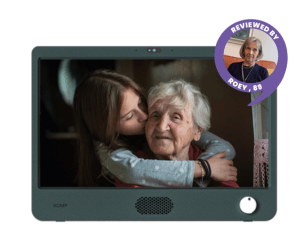
Komp is a purpose-built, stand-alone device that only needs mains power (no Wi-Fi). It only has one simple button making it incredibly easy to use and in addition to high-quality video calls on a big screen can show messages and family pictures.
What our reviewer, 89, thinks about Komp
Roey, 89, and her family kindly reviewed the Komp for us. They tested set-up, video calling capabilities, and more.
What Ben thinks about Komp
Komp is also a really good option. As a stand-alone device it can be moved anywhere that is convenient and can be used to show important reminders or messages by family members (as well as photos, the time, weather - which is a great addition). The video calling is good, with a big screen, good quality camera and microphone and a loud speaker. It requires a lot less set-up than CallGenie but does have a recurring monthly fee (£19 after the first 3 months).
What others say about Komp
"Komp is great for people who can't use a smartphone, a laptop or a tablet and helps to keep them connected and safe" -Midlands NHS Trust
"Overall, Komp is a valuable tool for older people who want to stay connected with their loved ones. It offers a simple user interface that uses features of modern tech without the complexity. However, it may not be suitable for everyone due to its cost and limitations." - Bernard from Chorlton Good Neighbours
What happens when you purchase Komp
Simply buy the Komp and the device will be sent to wherever you desire. Plug it in then connect it through to a smartphone app. This app is where you manage Komp, post photos, messages and make video calls. Multiple family members can have the app and send their own photos to the device. It works with 4G so no need to connect to Wi-Fi.
From £599
- Simple, purpose-built device
- Share photos & messages to the screen
- Doesn't require Wi-Fi
- Answers & ends calls automatically
3. A Tablet
Price up to you!

- Set-up how you like
- Lots of features if they want it
- Buy second hand or refurbished
Okay, we’re cheating a little here with this recommendation: buying a second hand smart tablet (iPad, android or similar) and organising it to suit the tech ability of your loved one
It is more responsibility, and fiddly than buying a purpose-built video calling device, and requires some research and work by you, but if you think your parent could manage it, it could be the best, and often cheapest, option.
First, choose your device
First, find the device you'll use. This is dependent on what you're comfortable using and how much you want to spend. The newer and bigger the tablet is, the more you'll spend. If you go for an Apple device, you'll likely spend a little more too. I would recommend using a site Back Market to buy a second-hand, refurbished tablet.
Obviously, make sure it has a good front facing camera (12mp (megapixels) or more). If you don't mind spending a little more I would buy the biggest iPad I could afford from the last 4 years. iPads are consistent in quality, easy to set-up and use, and last for a long time.
Set it up and away you go
Next you'll need to set it up with your loved one's tech ability in mind. If it is high, you can pretty much leave it as it is. If it is low you may want to lock some of the features like the App store (to avoid unwanted purchases) and remove any unwanted apps from the home screen - being mindful of potential scam opportunities (Email apps, Websites etc).
Then, you connect what you need to to enable video calling (an account). Make sure the volume is up. And consider buying some kind of stand for the device so they don't have to hold it.
Considerations
There are pros and cons when using a device that isn't just for video calls. The responsibility to make it usable and safe is with you, not the manufacturer. There are plenty of dangers of a device connected to the internet. Tablets are not as usable as some other devices on this list like CallGenie and Komp.
However, there is also a benefit with being more connected. You can add games to the tablet (all their favourites will be available), download movies and music, and even make it into an eReader. Again, this will be on you to set-up and make work!
Price: up to you!
- Set-up how you like
- Lots of features if they want it
- Buy second hand or refurbished
4. Amazon Echo Show
From £89

- Set-up how you like
- Lots of features if they want it
- Buy second hand or refurbished
- Linked to Amazon and Alexa
- Multiple price points
The Amazon Echo Show is a smart speaker system from Amazon that includes a tablet and camera, enabling video calls.
While the most recent generations have the best cameras and screens, they retail at nearly £200. However, you can pick up previous generations for well under £100.
What Ben thinks about Amazon Echo Show
Some people from our Facebook group have solved their video calling problem with an Amazon Echo Show. They are definitely a great option if you are well versed with the Amazon universe (you have an Amazon account and are comfortable with smart speakers). If your loved one has some tech-curiosity they might also benefit from all the other features enabled by an internet-connected speaker; "Alexa, play Radio 4", or, if you're connected to a music player, "Alexa, play some Classical music".
However, I think they overcomplicate the problem a little. They are fiddly to set-up for someone else, if you already have an Amazon device in your home you'll find it annoying to attach other device, in another home, to your account. When it comes to using the smart elements, in our experience, Alexa has proven too difficult to use, with many of the extra features going untouched. They also show ads and daily news on the screen, which can be unnecessary or confusing.
That all said, they can be a very cheap solution, with some of the older generations being sold for much less than £100. For me, I think there are better options out there, but not at this price.
What others say about Amazon Echo Show
On our Facebook Group (Caring for Elderly Parents):
"I've just bought an alexa show. It works fine for me to drop in to see her when she is sitting in her chair and she can respond. Getting her to ring me is proving harder..."
"My mum has an echo show in the care home and dad has an echo and echo show at home(he is blind). Neither have a smart phone or any other device. I can do drop ins to see them with echo show or call them (not great quality but can be useful). You need to be with the device to set it up but once done it can all be managed remotely on your device."
From Amazon:
"I bought this so my mum and dad could video call etc so very good in that respect. The bad is the fact it put skills on the front touch screen in wrong place so it's signing you up for something you probably don't want. Some of the answers she (Alexa) gives you are not always quite right either, but it does what I wanted regarding calling parents."
Some other video calling devices you may have heard of
There are more than just 4 solutions to help you video call with your older parents and relatives. However, many of them are not available in the UK, or are not better than the 4 we have above here. You may find them on other lists, but to save you some time, we’ve listed why we don’t think they are suitable below.
5. MyHomeHelper
The MyHomeHelper tablet and video calling device has many features that we really like, especially:
- Large screen
- Calendar clock
- Timed Reminders
- Video Calling
- Photos
But we haven’t had a chance to test it and don’t know anyone who has so we don’t feel comfortable putting it on our list of the best video calling devices for the elderly just yet.
If you are intrigued you can learn more about it on their website
6. ViewClix Smart Frame
Many lists have the ViewClix smart frame as a suitable video calling device. However, we don’t think it is a great option for UK consumers.
- A US-based company
- Only available on Amazon
- Requires monthly subscription
- Is not better than the Komp device
7. GrandPad
The Grandpad was a senior-specific tablet. Again, a US-based product that was sold via TechSilver in the UK, however, it is no longer available and we think it is because it became largely obsolete vs other tablets, especially at the price it was on the market for.
If it does become available in the UK again we will take another look as we think there is space for a product like this for our users.
- A US-based company
- Not available in the UK
8. Konnekt
We think the Konnekt actually looks pretty good. It’s a really big screen, it can be personalised a lot by the team at Konnekt (so you don’t have to). However, it is an Australian company and you can’t easily purchase it in the UK.
We think that instead of trying to get a Konnekt you would be better off with a UK-based option.
- Not available in the UK
None of these options looking quite right for you? Some people prefer to go for a mobile phone for their loved one. We have done a run down of the best mobile phone options for the elderly, across a variety of different tech friendliness.
Which video calling device is best for my relative?
The million dollar question. Ultimately, it depends on a what matters to you and the person you’re buying for: tech-capability, features vs simplicity, value, set-up.
Best single purpose video calling device
Our Choice: Call Genie
Pros
- Requires nothing from the user
- Uses the TV, the biggest screen you have
- UK-based support
Cons
- A more expensive option
- Some friction to set-up initially
Best multi-purpose for elderly
Our Choice: Komp or MyHomeHelper
Pros
- Requires nothing from the user
- Big screen, designed for video calling
- Send photos, reminders, weather, clock
- Simple to set-up
Cons
- Expensive
- Requires some effort from the family to use effectively
Best value video calling device
Our Choice: A second hand tablet
Pros
- Great camera quality available
- Under £60 possible
- No subscription fees
- Ultimate choice
Cons
- Easy to be too complicated for user
- A bit of a lottery as to quality
- More vulnerable to scams
- No support team
Frequently asked questions about video calling for the elderly
What makes a good video calling device for the elderly?
A good video calling device for an older person should be extremely easy-to-answer, require limited technical knowledge day-to-day, have a good quality video and microphone, and always be available to use without much preparation.
What is the best video calling device for somebody with dementia?
A video calling device for someone living with dementia should be easy-to-use, and not dependent on learning how a new device works.
We think that the CallGenie is the best video calling device for someone with dementia because it answers automatically, and uses the TV (a piece of technology that people with dementia tend to be familiar with).
You might also consider a Komp or My Home Helper for their reminder and clock features.
Are video calling devices for the elderly easier than video calling on phones?
Simple devices for video calling for the elderly are usually easier than video calling on smartphones. This is because smartphones tend to have a greater number of features, and require more technical knowledge.
Video calling devices built specifically for the elderly, like the Callgenie, are built with simplicity in mind.
The screen size on a smart phone, might also make it more difficult for an older person to see.
Are video calling devices easy to set up?
Video calling devices are easy for most people to set up.
However, you might want to install the device together, to make sure everyone understands how it works and do a couple of test runs.
Can you video call without Wi-Fi?
It depends on the video calling device. Most will require a Wi-Fi connection unless they explicitly say that they have a mobile connection (e.g. 4G) in built - like Komp.
Do I need to buy a webcam for my elderly relative?
All of the video calling device options on this page either have a camera built-in or are purchased with a camera. If you are buying a second-hand tablet just make sure the one you are buying has not only a camera, but a good one.
What internet speed is needed for video calling?
As a minimum 10mbps (megabits per second) download speed and 5mbps upload is required for video calling. However, at these speeds you may encounter drop outs, buffering and low quality. At 50mbps download speed, 20mbps upload, you should eliminate most of these issues.
You can test your speeds for free using online checkers such as this one.
Do video calling devices for the elderly record the calls?
Video calling devices for the elderly do not record the calls. Video calls on most of the major video calling services are encrypted (can't be monitored by anyone) for additional privacy.
Affiliate commission disclosure: Age Space is free to read and use. To help fund this, if you click on some links and make a purchase we get a small commission, at no extra cost to you. Thank you for indirectly supporting Age Space!